> For the complete documentation index, see [llms.txt](https://help.steeple.com/llms.txt). Markdown versions of documentation pages are available by appending `.md` to page URLs; this page is available as [Markdown](https://help.steeple.com/en/modules/module-compteur-accidents-de-travail.md).
# Work accident counter module
What could be more important than safety! The Work accident counter module helps raise awareness among all employees about the issue.
📢 Only members with the Administrators status can install modules!
#### How do I install the workplace accident counter?
**Step 1** : Go to your **Administration** then in the section **Modules** then the tab **Available**. Once the indicator module has been found, click on **Learn more** then **Install.**
\
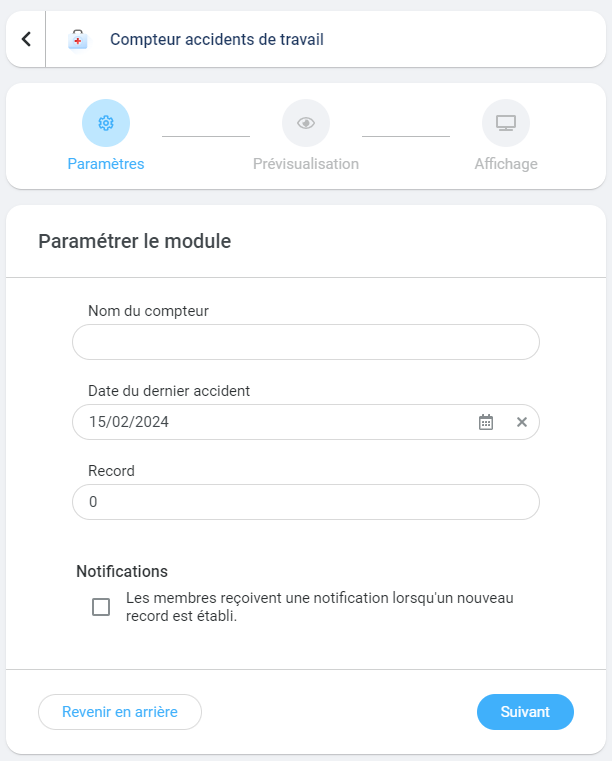
**Step 2** : Fill in the required fields when publishing the module online:\
🔷 The counter name (examples: warehouse, level 1, Lorient depot...)\
🔷 Date of the last accident\
🔷 The record established so far\
Thanks to the option **Notifications**, you can also choose to alert members when the record is broken. Click on **Next** once all the fields have been entered.
**Step 4** : Preview the module
**Step 5** : If you have a touchscreen connected to your community, you can add this module to the display on the TV. By default, the module is available on mobile and browser versions.
**💡** It is possible to install several indicator modules!\
Each site, depot, or company location will be able to share the latest records and its performance in this area.
📢 Setting up the **The workplace accident module requires regular monitoring** **and updates** by the person who installed the module.
#### How do I modify a counter or reset it to zero?
To do this, go to the**Administration**, tab **Modules**, find the module in the section **Installed** then click on **Settings.**\
In the block **Settings,** click on the option **Counter information**.\
Update all fields and change the date of the last accident to reset it to zero.\
#### How do I uninstall a counter?
To do this, go to the**Administration**, tab **Modules**, find the module in the section **Installed** then click on **Settings.** A new window opens and at the top right there will be the red button **Uninstall**.