> For the complete documentation index, see [llms.txt](https://help.steeple.com/llms.txt). Markdown versions of documentation pages are available by appending `.md` to page URLs; this page is available as [Markdown](https://help.steeple.com/en/mises-a-jour-produit/semaine-2026-04-27.md).
# Week of 27/04/2026 — Statistics app: added apps / Messaging - desktop notifications
### Statistics — Redesign of the administrator experience and new management tools
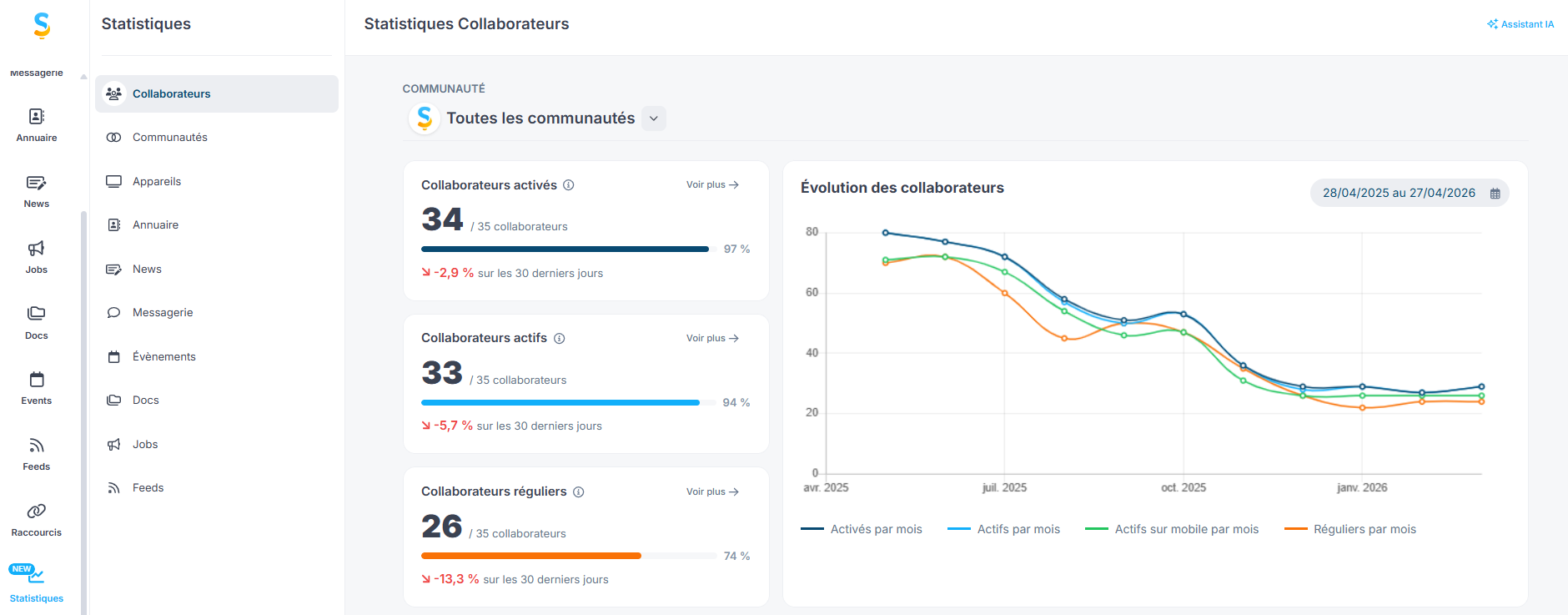
Until now, Statistics were accessible only from Administration and were limited to Posts, employees, and the News app. This limited scope made it difficult for administrators to oversee activity globally. This update aims to provide a consolidated view of the organization by now covering all applications (Jobs, Messaging, Docs, Events, Feeds) as well as the use of Devices (screens and mobile), to better track employee engagement and content performance.
#### 🆕 What has been updated
* **The Statistics app is available outside Administration** for better visibility.
* **Global view of the organization** : administrators can now view Statistics across the entire organization, with visibility over all apps (Jobs, Messaging, Docs, Events, in addition to Posts and employees).
* **Tracking the use of Devices** : integration of data dedicated to the use of TV screens and the mobile app.\
 ### **Messaging – Desktop Notifications so you never miss a thing**
Until now, Messaging notifications were only visible in the Steeple app, which forced employees to keep the app open or log back in regularly so they wouldn't miss an important message. This update aims to make real-time communication smoother by making notifications visible directly on the desktop, even when Steeple is not in the foreground.\
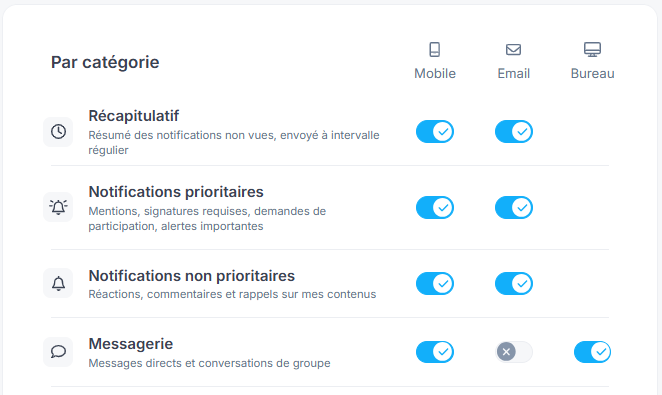
All you have to do is enable this notification in your notification center (Desktop).
🆕 What has been updated
* **Native desktop Notifications** : receiving new messages directly on the desktop (Windows and macOS), without having to keep Steeple active in the foreground.
* **Improved responsiveness** : a single click on the notification lets you go directly to the relevant conversation.
### **Messaging – Desktop Notifications so you never miss a thing**
Until now, Messaging notifications were only visible in the Steeple app, which forced employees to keep the app open or log back in regularly so they wouldn't miss an important message. This update aims to make real-time communication smoother by making notifications visible directly on the desktop, even when Steeple is not in the foreground.\
All you have to do is enable this notification in your notification center (Desktop).
🆕 What has been updated
* **Native desktop Notifications** : receiving new messages directly on the desktop (Windows and macOS), without having to keep Steeple active in the foreground.
* **Improved responsiveness** : a single click on the notification lets you go directly to the relevant conversation.