> For the complete documentation index, see [llms.txt](https://help.steeple.com/llms.txt). Markdown versions of documentation pages are available by appending `.md` to page URLs; this page is available as [Markdown](https://help.steeple.com/en/mises-a-jour-produit/semaine-2026-04-20.md).
# Week of 20/04/2026 — Multi-app search and notification preferences
### Search — Unified search and new interface
Search had until now been limited to certain content (Posts and collaborators), which made it harder to access information spread across several apps. This change aims to **centralize search** and to offer a smoother, faster, and more complete experience for finding any content in Steeple.
#### 🆕 What has been updated
* **Extending search to all apps** : Docs, Events, conversations and messages, in addition to Posts and collaborators.
* **New interface in the form of a modal window (overlay)** accessible from the sidebar, for a smoother experience.
* **Visual improvements** : new design for the search button, highlighting of search terms, and improved readability of results.
### **Notifications – Simplified management**
\
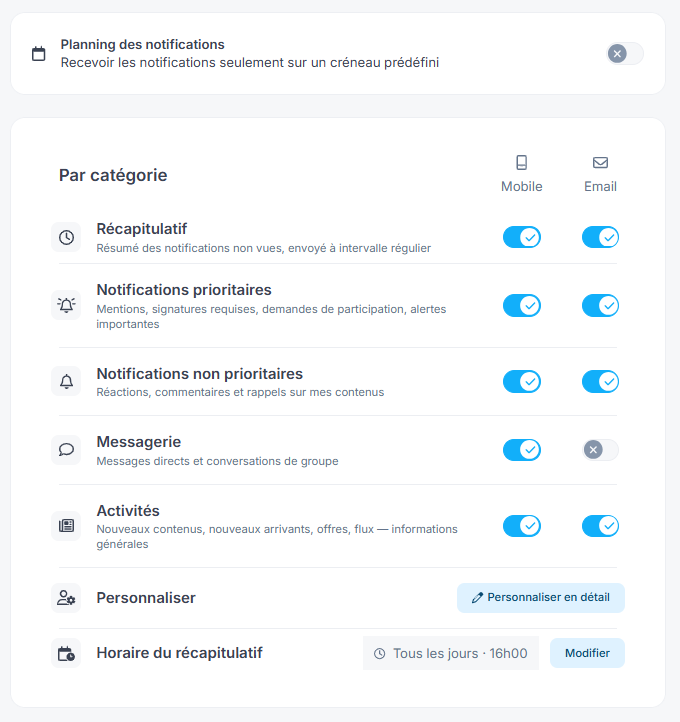
Managing Notifications could be complex and difficult to configure, with many options that were hard to read. This change aims to **simplify their management** by making them clearer, more structured, and easier to customize to each person's needs.
**🆕 What has been updated**
* Grouping Notifications into **a few major themes** for better readability:\
**Summary**, **Priority Notifications**, **Non-priority Notifications**, **Messaging** and **Activities**.
* New interface allowing you to **easily manage preferences by channel** (mobile and email).
* Ability to **configure Notifications by category** and better control what you receive.