> For the complete documentation index, see [llms.txt](https://help.steeple.com/llms.txt). Markdown versions of documentation pages are available by appending `.md` to page URLs; this page is available as [Markdown](https://help.steeple.com/en/annuaire/referents-steeple.md).
# Steeple contacts
Your employees know who to contact directly from the Directory, and interactions with Steeple become smoother.
#### Introduction
The Referents page is accessible from the Steeple Directory. It indicates, for each management area of the tool, which employee is the referent.
Your employees know who to contact directly from the directory, and exchanges with Steeple become smoother.
#### Referent areas
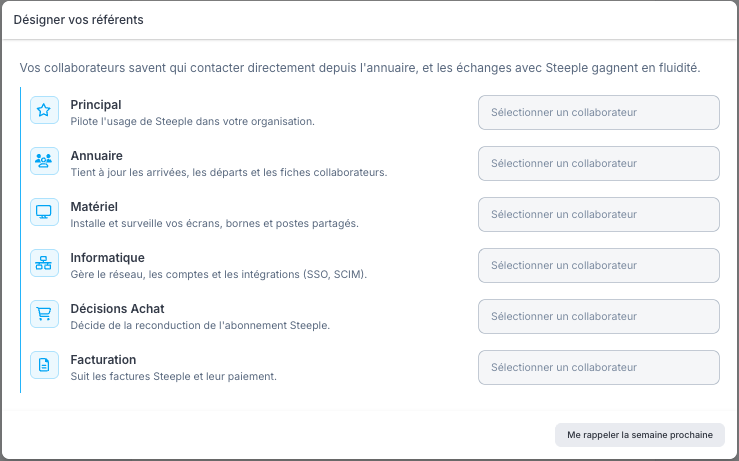
Six areas can be assigned a referent:
* **Main** : oversees the use of Steeple in the organization.
* **Directory** : keeps arrivals, departures, and employee records up to date.
* **Hardware** : installs and monitors screens, kiosks, and shared workstations.
* **IT** : manages the network, accounts, and integrations (SSO, SCIM).
* **Purchasing Decisions** : decides whether to renew the Steeple subscription. Not visible to members.
* **Billing** : tracks Steeple invoices and their payment. Not visible to members.
For each area, the record shows the name of the designated referent. Click View profile to access their employee record.
#### Assign referents
Referents are assigned from one of these two locations:
* Administration > Settings > Referents
* Directory > Assign referents
A collaborator selector is offered for each of the six areas. It is possible to postpone the assignment using the Remind me next week button.
#### Access rights
Only administrators can [assign or modify referents](https://app.steeple.com/directory/referents), regardless of the entry point used (Administration or Directory).